Aug 24, 2026

The fashion industry depends on speed, collaboration, and organized product information to move collections from concept to production.
As design, product development, sourcing, and manufacturing teams work more closely together, relying on spreadsheets and emails alone can make product development difficult to manage.
Fashion product lifecycle management (PLM) gives teams one place to organize development information, collaborate, and move collections from concept through production.
This guide explains what fashion PLM is, why fashion brands use it, the value it brings to a growing business, and how to choose the right platform for your team.
TL;DR
Fashion PLM is software that helps fashion teams manage product information, tech packs, approvals, suppliers, and workflows from concept through production.
It supports design, product development, sampling, production preparation, and product archiving by keeping specifications, materials, comments, and revisions in one shared system.
Key features include product data management, digital tech packs, material libraries, workflow tracking, supplier collaboration, reporting, integrations, and costing.
Onbrand combines AI-powered design with live tech packs, sample tracking, costing, vendor collaboration, configurable workflows, and ongoing implementation support for growing fashion brands.
What Is Fashion PLM Software?
Fashion PLM software is an information management system for fashion products.
It helps teams organize and manage product information throughout the entire product lifecycle, from concept and design to development, production, and delivery.
A PLM platform serves as a centralized platform where designers, product developers, sourcing teams, merchandisers, and manufacturers work from the same product records instead of relying on spreadsheets, emails, and separate files.
It centralizes product data, including specifications, materials, colors, measurements, approvals, and tech packs, so every team has access to the latest information.
Built-in product data management keeps revisions, approvals, and product records connected throughout the entire product development process.
In simple terms, PLM manages the information and workflows that help fashion teams keep product development organized and move approved products toward production.
Who Uses Fashion PLM?
Fashion PLM is used by the teams involved in developing products from concept to production. By keeping product information in one place, it helps every department work from the latest specifications, approvals, and product records.
Fashion designers – Create concepts, review designs, and update product details throughout development.
Product developers – Manage specifications, tech packs, samples, and product records as styles move toward production.
Technical designers – Document garment measurements, construction details, and fit updates.
Merchandisers – Track product assortments, seasonal collections, and development progress.
Sourcing teams – Coordinate materials, suppliers, and production timelines.
Production managers – Monitor approvals, manufacturing readiness, and production schedules.
Manufacturers and suppliers – Review the latest specifications, comments, and approved tech packs to produce garments accurately.
How Fashion PLM Works
Fashion PLM supports product development by keeping product information connected as a style moves from concept to production. Each stage builds on the previous one, giving every team access to the latest product records, approvals, and specifications.
Product Planning
Every product begins with research and planning before any design work starts. Teams use findings from market research and trend analysis to guide seasonal direction, customer needs, and product opportunities.
Those decisions become the starting point for product concepts, initial specifications, and development planning inside the PLM system.
Design and Development
Once a concept is approved, designers create design files, define product specifications, and build fashion tech packs.
Teams continue updating product data as materials, colors, measurements, and construction details are reviewed. Keeping this information in one place helps everyone work from the latest product records throughout development.
Sampling and Approvals
Samples move through several review stages before production. Designers, product developers, and suppliers record comments, update specifications, and approve revisions in one place.
Built-in supplier collaboration helps teams and vendors work from the latest product information throughout the review process.
Production and Launch
After samples receive final approval, product records give manufacturers the specifications, materials, measurements, and construction details needed to prepare for production.
Teams continue using PLM records for quality control, production planning, and supplier communication as products enter the manufacturing process.
Organized product information also helps teams monitor changes that may affect production costs before products are launched.
Product Archive and End of Life
After production is complete, product records remain available for future reference.
Development history, approvals, specifications, and tech packs remain connected through a product's end of life, making it easier to review previous collections and reuse product information when planning new styles.
This historical information also helps teams avoid recreating records from scratch.
Why Is Fashion PLM Important?
Product development in the fashion industry has become more complex as market demands change and collections involve more teams, suppliers, and product information.
Most fashion companies manage hundreds of product details throughout development, and relying on spreadsheets and email alone can make it difficult to keep everything organized.
Fashion PLM helps teams organize product information and supplier communication as products move through development, sourcing, sampling, and production preparation.
Designers, product developers, sourcing teams, and manufacturers work from the latest specifications, approvals, and tech packs, helping support quality control, consistent product quality, and better product management.
The key benefits of fashion PLM include improved operational efficiency, fewer manual updates, the potential to lower product development costs, and better visibility into changes that may affect production costs.
As part of the fashion industry’s digital transformation, PLM gives teams a more organized way to develop products and prepare approved styles for production as timelines become shorter and collections become more complex.
Common Features of Fashion PLM Software
Most fashion PLM platforms include tools that help teams organize product information, collaborate, and keep development moving. Although features vary between systems, these are the capabilities most fashion brands expect:
Product data management – Stores product specifications, measurements, colors, and revisions in one place for more efficient management of product records.
Tech packs – Creates and manages digital tech packs so suppliers always receive the latest product requirements.
Material libraries – Organizes fabrics, trims, and color options to support material selection and product consistency.
Workflow management – Tracks tasks, approvals, deadlines, and sample reviews so development stays on schedule.
Supplier collaboration – Gives vendors access to approved specifications, comments, and updates without relying on long email threads.
Reporting tools – Provide visibility into product status, development progress, deadlines, and outstanding tasks.
Integrations – Connects with enterprise resource planning (ERP) systems, design tools, and other business software so product information stays connected between teams.
Costing – Compares material, supplier, and style costs so teams can review quotes, track changes, and provide more reliable cost information for margin planning and pricing strategies.
Embracing Modern Cloud PLM
Modern PLM software has made product lifecycle management more accessible for growing fashion brands.
What was once considered expensive and difficult to implement is now available through cloud-based platforms with subscription pricing, making it easier for smaller teams to adopt the right PLM solution without significant IT investment.
A modern cloud PLM keeps product developers, designers, suppliers, and other teams working from up-to-date information wherever they are.
Integrated supplier collaboration reduces the need to exchange updated files through long email threads, helping teams and vendors review the latest product records.
Many platforms also include integration capabilities with ERP systems and fashion design tools, allowing product information to move between connected business systems.
As product lines and teams expand, a cloud PLM can support more users, collections, suppliers, and workflows as product development becomes more complex.
This gives growing brands a tailored PLM solution that can adapt to the needs of the retail industry over time.
Curious how quickly teams can move from spreadsheets to cloud PLM? Schedule a demo with Onbrand.
Overcoming the Challenges of PLM Adoption
Adopting a fashion PLM system requires teams to change how they store information, review products, and communicate with suppliers. The main challenges usually involve data preparation, system connections, and user adoption.
Existing product records may contain duplicate, outdated, or incomplete information that needs to be reviewed before migration. Preparing reliable PLM data before the move helps teams begin with organized specifications, materials, supplier details, and product records.
Brands may also need to plan connections with ERP, inventory management, design, and other business systems so relevant information can move between platforms without repeated data entry.
User adoption is equally important. Designers, product developers, sourcing teams, and suppliers need clear training based on the tasks they perform every day.
Choosing a fashion-specific PLM with migration guidance, onboarding support, and familiar development workflows can make the transition easier.
Choosing the Right Fashion PLM System
Choosing the right PLM solution starts with understanding how your team develops products today and what challenges you want the system to solve. As you compare options, focus on how each platform supports your daily work instead of comparing feature lists alone.
Ease of use – The best PLM software should be easy to learn and use, helping teams adopt the system without a long learning curve.
Implementation cost – Compare pricing, setup requirements, and vendor support to understand the total cost of getting started and maintaining the system.
Tech packs – Look for tools that simplify creating and sharing fashion tech packs while keeping revisions organized.
Product data management – Choose a platform that keeps specifications, material selection, approvals, and other product records organized and easy to update.
Reporting tools – These tools help teams monitor product status, deadlines, and development progress.
Supplier collaboration and integrations – Look for a platform that supports supplier collaboration and seamless integration with ERP systems, design software, and other business tools so approved product information can be shared more efficiently.
Onbrand: The Premier PLM Solution for Fashion
Onbrand brings AI-powered design and PLM into one connected platform for fashion brands. It supports the creative and development work that happens before production, from early concepts and line planning to fashion tech packs, samples, approvals, and vendor communication.
Create and Explore Designs with Onbrand AI Design
Onbrand AI Design gives designers a dedicated space to create concepts, test ideas, and prepare visuals for review.
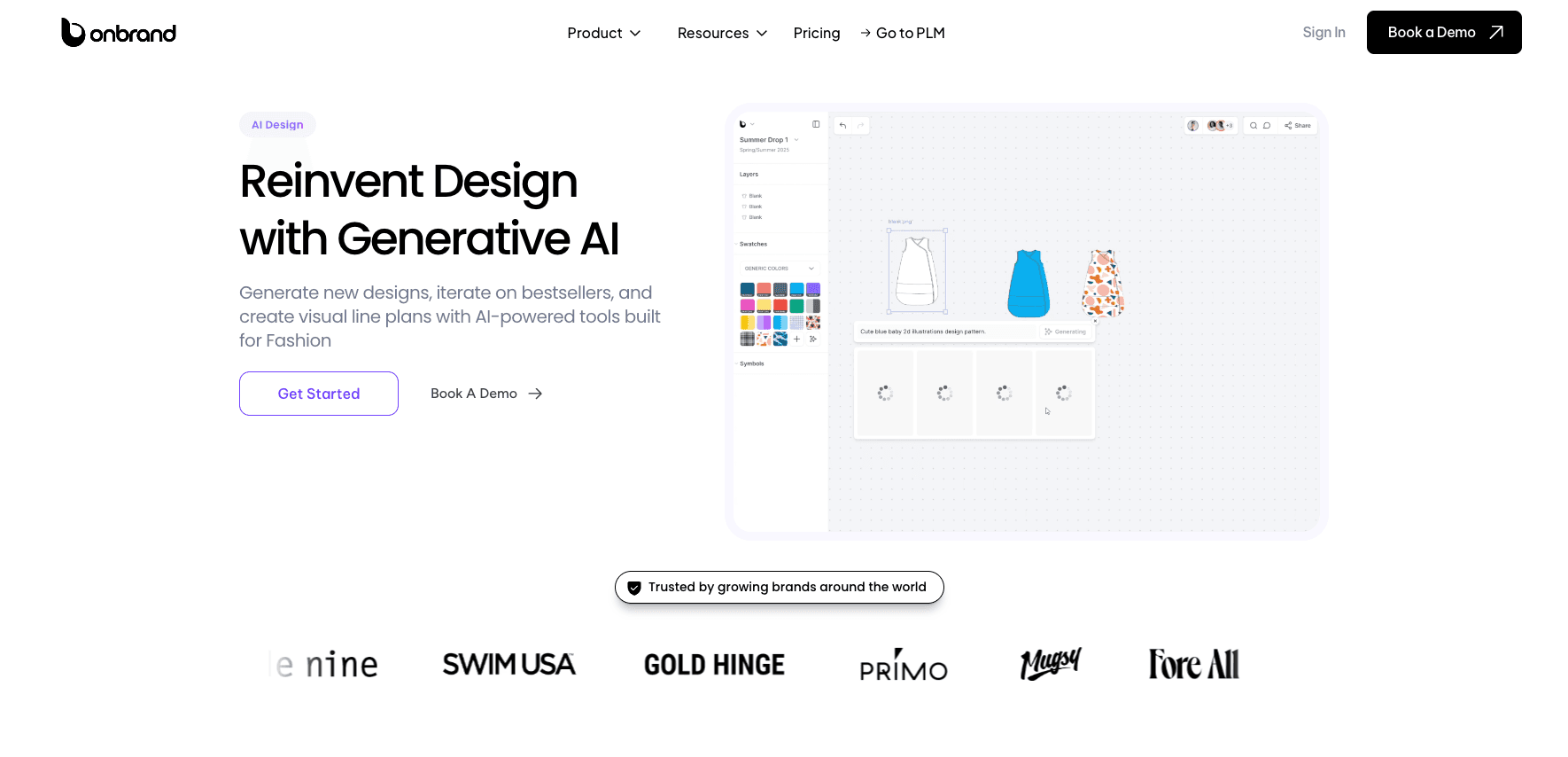
Teams can generate new garments from text prompts, sketches, or reference photos, then explore alternate colorways, trims, cuts, and design details without rebuilding each concept from the beginning.
Designers can turn sketches into polished mockups, flat drawings, or on-model visuals for internal reviews, buyer presentations, and factory communication.
Shared canvases, mood boards, contextual comments, and visual line plans also help designers, merchants, and category managers review collections together.
Onbrand reports that teams can achieve design turnarounds up to 10 times faster, create 30–50% fewer physical samples, and save more than 10 weeks each year.
Designs and approved assets can then move directly into Onbrand PLM, giving product developers a practical starting point for tech packs and product development.
Manage Fashion Product Development with Onbrand PLM
Onbrand PLM helps brands manage fashion product development through live product records, configurable project stages, sample tracking, approvals, and direct factory communication.

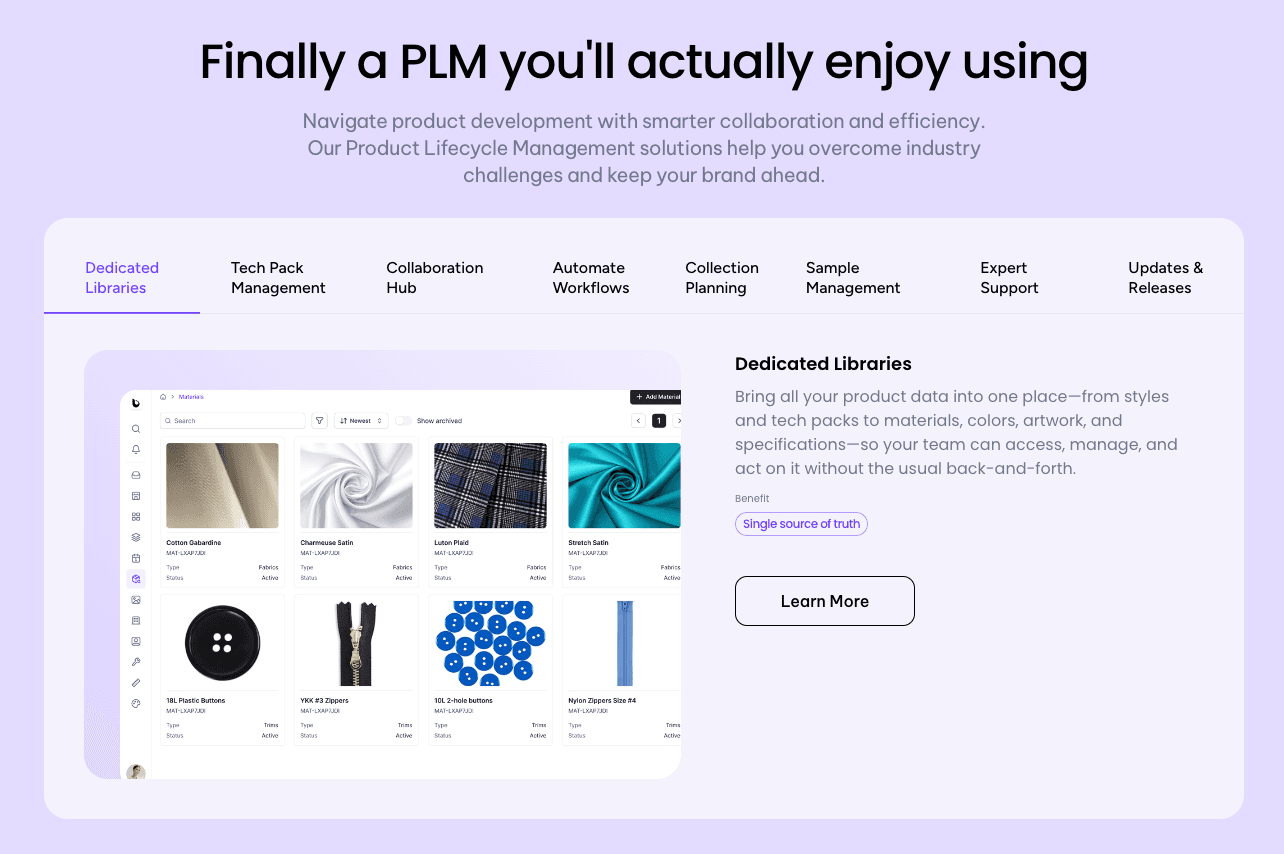
Its web-based tech packs work more like shared online documents, so brands and vendors always review the current version instead of exchanging updated PDFs through email.
Dedicated libraries keep styles, materials, colors, artwork, measurements, and specifications easy to access. Vendors can comment directly on product records, and teams can track tasks, approvals, and timelines without relying on separate spreadsheets or chat threads.
Onbrand customers have reported 55% faster tech pack creation and development timelines shortened by four weeks. PLM implementation can take as little as 10 days for data migration and onboarding, with many brands fully up and running within two to four weeks, depending on project scope.
Built for fashion, apparel, outdoor, and footwear brands, Onbrand gives growing teams a more visual and configurable alternative to older PLM systems.
Every customer also receives ongoing support and a dedicated account representative without separate support fees.
Implementing Your New Fashion PLM System
A successful PLM implementation takes planning, organized product data, and support from every team involved in product development. Following a structured rollout helps brands move to a new PLM system with less disruption and keeps the entire process organized from the beginning.
Assemble the Right Team
Start by identifying representatives from design, product development, sourcing, production, and leadership.
Each team brings different requirements that should be considered during setup. Early collaboration also helps build confidence before implementation begins.
Align Goals with System Capabilities
Define what you want the PLM process to improve before configuring the platform.
This may include tech packs, approvals, sample management, or vendor communication. Clear priorities help guide implementation decisions.
Prepare Essential Data
Review existing product records before migrating them into the new system.
Organize styles, materials, specifications, supplier information, and artwork so teams begin with reliable data. Removing outdated records also reduces unnecessary work after launch.
Customize and Set Up Accounts
Configure user roles, workflows, libraries, and approvals to reflect how your team develops products.
The platform should support your existing process instead of forcing unnecessary changes. A setup that reflects daily work is easier for teams to adopt throughout the entire lifecycle.
Train Users and Launch
Provide practical training for each department before introducing the platform company-wide.
Focus on the tasks employees perform every day so they can begin using the system with confidence. A phased rollout also gives teams time to adjust.
Phase In Your Process with Manufacturers
Introduce suppliers gradually so they can review specifications, comments, approvals, and fashion tech packs directly in the platform.
This reduces dependence on spreadsheets and long email conversations. Working from shared product records also helps everyone stay aligned.
Monitor Adoption and Adjust
Review how teams are using the platform after launch and identify areas that need improvement. Small adjustments to workflows or training often improve long-term adoption.
For businesses in the fashion and apparel industry, ongoing refinement helps teams get the most value from their PLM investment.
Grow Your Fashion Brand With Confidence Using Onbrand PLM
Fashion PLM gives brands a better way to organize product information, collaborate with suppliers, and keep product development moving from concept to production.
Choosing the right platform can also reduce manual work, improve visibility into product records, and help teams spend more time developing products instead of managing spreadsheets.
If you're looking for a modern fashion PLM built for growing brands, Onbrand combines AI-powered design, live tech packs, vendor collaboration, and product development in one connected platform.
FAQs About Fashion PLM
Why do apparel brands use fashion PLM?
Apparel brands use fashion PLM to organize product information, manage approvals, collaborate with suppliers, and reduce manual work during product development. Better visibility into product records can shorten time to market and support cost management by reducing repeated work and production errors.
Can fashion PLM integrate with other business systems?
Yes. Many fashion PLM platforms support integrations with ERP systems, design software, and other business tools. Depending on the integration, product information can be shared with systems that use inventory, pricing, or sales data for planning and reporting.
What are examples of PLM?
Examples of fashion PLM platforms include Onbrand PLM, Centric PLM, Backbone PLM, WFX Fashion PLM, PTC FlexPLM, DeSL PLM, and Aptean Apparel PLM. Each platform supports product development, but they differ in implementation, collaboration features, integrations, and pricing.
Which PLM is best?
The best fashion PLM depends on your brand's products, team size, and development process. For growing fashion and consumer brands, Onbrand PLM is a leading choice because it combines AI-powered design, live tech packs, vendor collaboration, fast implementation, dedicated support, and configurable workflows in one modern platform.
Why is fashion PLM useful for fast fashion brands?
Fashion PLM is useful for fast fashion brands because it helps teams manage frequent product updates, organize product information, and coordinate supplier communication. It also supports supply chain management by keeping product requirements current and accessible, although it does not manage the entire supply chain.