Product lifecycle management (PLM) software is a system used to manage product data from concept through production in one structured platform.
In fashion, it keeps tech packs, bills of materials (BOMs), revisions, and approvals connected as collections grow.
Most brands do not feel the need for that structure at the beginning.
A few seasons ago, spreadsheets and shared drives felt manageable. Now, you are handling dozens of styles, multiple colorways, overlapping sample rounds, and constant factory updates.
One small measurement change affects costing, sourcing, and production timelines. Version confusion slows decisions.
That shift is not a failure. It is a sign your brand is scaling.
As complexity increases, brands are searching for the best PLM software that centralizes specifications, materials, and vendor communication so product development stays controlled.
This guide explains what PLM software is, how it fits into the fashion product lifecycle, and what it manages inside a fashion brand.
TL;DR
PLM software helps fashion brands manage product data from concept through production as collections scale beyond spreadsheets.
A fashion PLM system structures styles and SKUs, live tech packs, color-aware BOMs, material libraries, vendor communication, and sample tracking in one record.
The fashion product lifecycle follows four phases: concept and line planning, development, sourcing and sampling, and production handoff.
A practical eight-step rollout includes starting with one collection, standardizing style data, building tech pack templates, structuring BOMs by colorway, assigning approvals, and tracking sample stages.
Onbrand PLM supports live tech packs, structured BOMs, and vendor collaboration, while Onbrand AI Design supports early concept exploration when needed.
What Is PLM Software?
PLM software is a structured system for managing product data throughout the entire product lifecycle.
In fashion, that lifecycle starts with the initial concept, moves through development, sourcing, sampling, and production, and ends at the end of life when a style is retired.
A PLM software solution supports the product development process by keeping specifications, materials, costing, approvals, and document management inside one centralized platform.
It gives every team access to the same product record instead of relying on disconnected files.
PLM software replaces scattered spreadsheets with a centralized system that reduces data silos between design, development, and sourcing. It also supports product management through centralized product records, revision history, and collaboration throughout development.
A digital PLM solution connects design details with raw materials, supplier updates, manufacturing data, quality management, and product compliance in one system.
These PLM tools help fashion brands keep product development organized from planning through production.
Unlike legacy file storage or project tracking systems, modern PLM software is built specifically for fashion workflows and structured product data.
The Fashion Product Lifecycle Management
Fashion product development follows a structured sequence. Each phase builds on the previous one. Early decisions affect margin, timelines, and product quality later in the season.
Understanding this workflow helps teams manage the product lifecycle with better coordination from concept to product launch.
Concept and Line Planning
Concept and line planning set the direction for the season. Design defines silhouettes, key fabrics, and price positioning.
Mood boards, reference images, and early sketches shape the overall look. The line plan outlines how many styles sit in each category and how colorways are distributed.
Planning begins with market research and analysis of market trends. Merchandising works with design to confirm category mix, target margins, and volume goals before styles move into development.
Development
Development translates the concept into build-ready detail.
Technical designers create measurement charts, grading rules, and construction callouts. Fit samples move through structured review cycles. Each revision must be recorded so updates to length, sweep, or sleeve pitch do not disappear between rounds.
Precise documentation protects product quality and keeps timelines stable as styles progress toward production.
Sourcing and Sampling
Sourcing connects design intent to factory execution.
Fabric and trim selection, supplier confirmation, and target costing move together. Teams may also evaluate materials that support innovative and sustainable products before locking suppliers. Proto, fit, and pre-production samples confirm construction and final details.
Factory feedback can influence timelines and material availability. Consistent coordination supports smoother supply chain management and reduces disruption during bulk preparation.
Production Handoff
Production begins once specifications, materials, and costs receive final approval.
Tech packs reflect the agreed construction. BOMs confirm fabrics, trims, and finishes. Labeling, compliance details, and quality control checks must be completed before bulk production begins.
The style then moves into manufacturing, shipping, and eventual product launch, completing the fashion product lifecycle before entering the broader supply chain.
What PLM Software Manages in Fashion
A PLM platform is the system of record for structured product data management in fashion brands. It does not replace creativity. It organizes PLM data that supports every stage of development.
Inside a fashion PLM system, each style holds the details about design, development, sourcing, and production needed to build the product. That structure also connects product data to other business systems without relying on disconnected spreadsheets.
Styles and SKUs
Each style begins with a unique code, season, and category.
Size ranges, colorways, and pricing tiers sit under that parent record. Status markers track whether the style is in development, sampling, or approved for production.
Consistent structure and version control help design and merchandising work from the latest product record during the assortment planning process.
Tech Packs
Tech packs contain flat sketches, construction callouts, graded measurement charts, and artwork placement notes.
Fit updates adjust specs directly in the measurement table. Revision history logs each change, so design and development teams can see what changed and when.
Specification management keeps updates tied to the correct version of the style, and supports controlled engineering change processes.
Bills of Materials
BOMs list every fabric, trim, and component required to build the garment. Each line includes supplier reference, unit cost, and placement details.
Colorway-level entries reflect fabric swaps or hardware finish changes. BOM management gives sourcing teams accurate product information before styles move into bulk manufacturing processes.
Materials and Trim Records
Material records store fabric composition, weight, finish, approved supplier, and color references such as Pantone or Coloro. Trim records list size, finish, and supplier details for items like zippers, buttons, and labels.
Keeping this design data inside the product record makes updates easier to track without relying on email or disconnected files.
Vendor and Sample Records
Sample stages, from proto to pre-production, sit inside the style record. Fit comments document adjustments such as sleeve length or neckline depth.
Approval status shows whether the style is ready for bulk. Vendor messages and confirmations stay connected to the product data, so decisions remain visible to the full team.
Who Uses PLM Software Inside a Fashion Brand
A PLM platform touches every role involved in product development. It is not limited to one department. It supports daily project management and keeps product records aligned with real work happening inside the brand.
PLM software is most commonly used by:
Designers - Set up styles, attach sketches, and review colorways. They reference product data while refining the concept and reacting to customer feedback.
Technical designers - Manage measurement charts, construction notes, and fit approvals. They control engineering data inside the tech pack and document spec revisions.
Product developers - Track sample status, costing updates, and timeline shifts. They rely on accurate product data to keep development moving toward launch, protect time to market, and help the brand reach the market faster without sacrificing product quality.
Sourcing managers - Manage supplier assignments, confirm pricing, and coordinate material availability before production begins. They also support resource allocation by balancing supplier capacity with production schedules.
Production managers - Review approvals and confirm readiness for bulk. They check details before styles move into manufacturing.
Merchandisers and executives - Review finalized records to support data-driven decision-making and align product direction with broader business strategy.
Each role works from the same product record, allowing cross-functional teams to collaborate without relying on disconnected spreadsheets or legacy systems.
What Changes After You Adopt a PLM Platform
Once you begin implementing PLM, product data no longer lives in scattered files.
Styles, tech packs, BOMs, and approvals sit inside one structured record. Revision history becomes visible, so you can see who changed a measurement and when. Fit updates stop getting lost in email.
Design, development, and sourcing work from the same source of truth. Access to real-time data reduces guesswork during sample reviews and costing updates.
Vendor comments stay attached to the style instead of sitting in chat threads. PLM integration also connects product records with systems such as ERP, reducing duplicate data entry.
Day-to-day business processes become easier to manage. Project managers spend less time reconciling spreadsheets and more time moving product forward.
Features such as workflow automation support automated workflows that reduce manual work, improve operational efficiency, and create more consistent handoffs between teams.
A structured PLM platform also strengthens data security, supports risk management by keeping product records organized, and simplifies change management as revisions move through development.
The result is fewer errors, better coordination, enhanced product quality, and measurable business value as product development becomes more complex.
How to Start Using a PLM Platform for Fashion Development
Rolling out a PLM platform works best when you treat it as a structured setup process. Do not migrate everything at once. Build the foundation first, then expand.
Step #1: Define a Controlled Rollout Scope
Start with one collection, category, or drop. FW26 Outerwear is enough. Avoid importing legacy seasons immediately.
Set up only the styles that are actively in development so you can test how your PLM processes function during real sample rounds.
Once that workflow is stable, modern PLM solutions make it easier to expand into other categories.
Step #2: Establish a Style Data Standard
Decide what information is required before a style can move forward. That usually includes style code, season, size range, target retail, target cost, fabric group, and category.
Lock naming conventions for colorways and sizes early. Good configuration control keeps reporting, revisions, and bulk handoff consistent as development progresses.
Step #3: Build a Core Tech Pack Template
Create a standardized tech pack structure that every category follows. Include a flat sketch page, construction callouts, graded measurement tables, artwork placement notes, and a revision log.
If you use computer-aided design files, attach them directly to the style record. Consistent documentation supports innovation and requirements management while reducing confusion during fit revisions.
Step #4: Configure BOM Structure for Colorways
Set up BOM lines per color variant instead of combining everything into one line. A Black jacket may use Pantone Black C, while Olive uses Pantone 5743 C with a different zipper finish.
Include supplier, unit cost, and placement notes per entry. Clear separation prevents mistakes when styles move into bulk.
Step #5: Assign Approval Ownership
Define who owns design, fit, and costing approvals. Document that inside the style record instead of tracking it in Slack or email.
If regulatory compliance applies to your category, confirm labeling and testing requirements before bulk approval.
Step #6: Centralize Vendor Communication
Record factory comments inside the style. Keep revision confirmations tied to the correct tech pack version.
A cloud-based PLM solution connects vendor communication with other integrated tools, keeping development decisions attached to the product record instead of scattered through email or chat.
Step #7: Track Sample Stages Structurally
Create defined sample stages such as Proto, Fit, Size Set, and Pre-Production. Move each style through those checkpoints deliberately.
Fit comments should sit next to the measurement table, not in a separate file. Approval status should show when the style is ready for bulk, supporting engineering change management throughout development.
Step #8: Align Concept Exploration With Development
If you use AI or digital tools during early concept work, define how those visuals move into development.
Concept sketches, fabric direction, and silhouette options should not live in separate folders once a style is approved. Create a handoff point where selected concepts become structured product records.
Onbrand AI Design supports early-stage concept exploration and visual iteration. Once a direction is approved, Onbrand PLM carries that same style into development, tech packs, BOMs, and production.
The connected workflow helps teams accelerate innovation without re-entering product data into a new system.
Onbrand PLM: Best PLM Software for Fashion Brands
The right PLM software for fashion brands should feel built for the way you already develop products.
It should handle live tech packs, structured BOMs, material libraries, sample tracking, and vendor communication without forcing you into rigid processes.
Onbrand PLM is designed specifically for fashion product development. Tech packs are web-based, so there are no exported PDFs floating around with outdated measurements.
When a sleeve spec changes, everyone sees the current version. That alone reduces production errors and delays, which often leads to significant cost savings during bulk production.
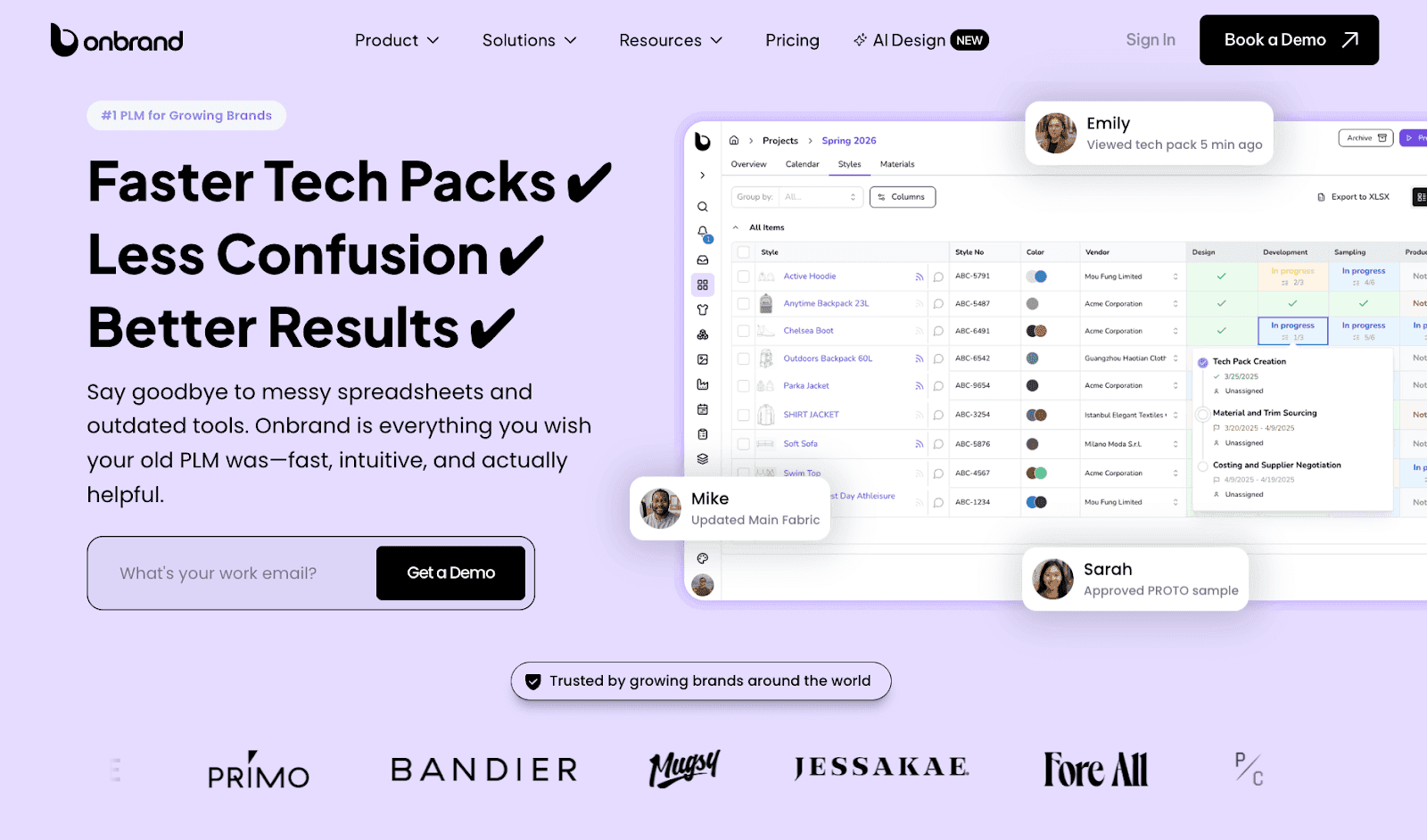
Brands using Onbrand PLM report measurable impact. Teams have cut tech pack creation time by 55 percent. Some reduced overall development timelines by four weeks.
Implementation typically takes about 10 days for data migration and setup, not months or years. Customers often describe it as the first PLM they actually enjoy using.
Updates roll out to all customers regularly. There are no versioned upgrades that require large fees. Onboarding averages two to four weeks, and support does not come with surprise consulting invoices. The system is configurable, so your design and development workflow stays intact.
Alongside Onbrand PLM, Onbrand AI Design supports the front end of the product journey. It focuses on concept creation and visual exploration before tech packs begin.
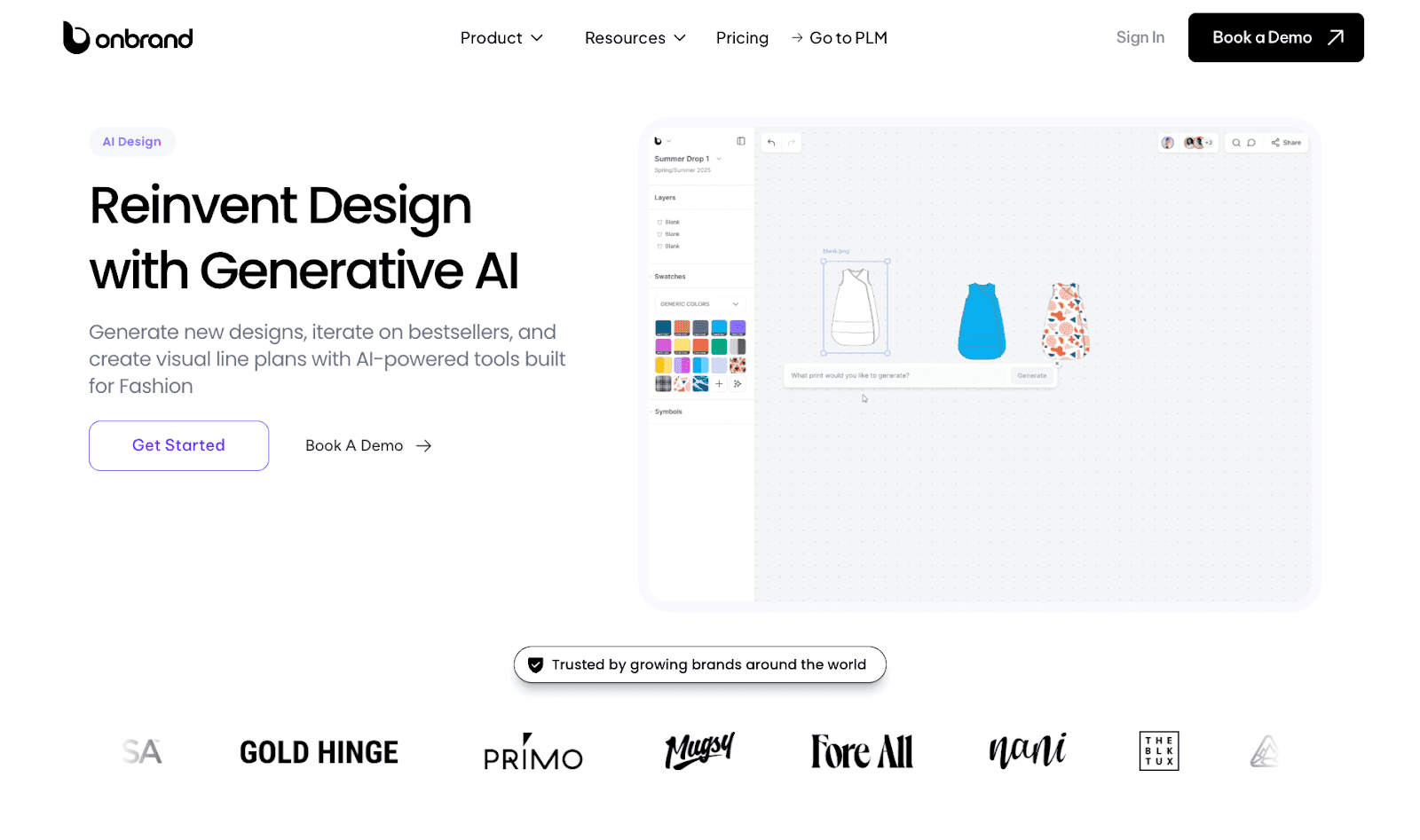
Designers can generate new styles from text prompts, sketches, or reference images. You can test colorways using Pantone or Coloro libraries, simulate fabrics in 3D, and create clean technical flats for review. Visual line plans and shared boards help align design direction early.
Once a concept is approved, visuals and key details move directly into Onbrand PLM. Development starts with structured data instead of disconnected files.
FAQs About What Is a PLM Software
What is an example of a PLM software?
Onbrand PLM is an example of PLM product lifecycle management software built for fashion brands. It helps teams manage product data, tech packs, BOMs, specification management, approvals, and supplier communication from concept through production in one system.
Is Jira a PLM software?
No. Jira is a project management platform designed to track tasks, issues, and software development work. It does not provide the structured product records, configuration management, technical product data, or built-in supplier collaboration found in modern PLM tools.
Is SAP a PLM software?
Yes. SAP offers PLM capabilities as part of its enterprise software portfolio. SAP PLM helps businesses manage product data, engineering changes, compliance, and product development while connecting with ERP systems. It is commonly used by large manufacturers undergoing digital transformation and managing complex operations.
Does every PLM system include AI features?
No. Many PLM systems focus on managing product data, workflows, and collaboration. Some enterprise platforms use machine learning to support analytics, forecasting, or recommendations, but these capabilities are optional and are not part of every PLM system.