Jun 23, 2026

A design team working on a new collection may explore dozens of concepts before selecting a direction for development.
Creating every variation manually takes time, especially when colors, prints, silhouettes, and styling details continue to change.
That is one reason fashion brands are starting to use artificial intelligence (AI) during clothing design.
AI can help designers explore more concepts, variations, and creative directions before development begins. A cost-effective benefit often follows because teams can review more options before sampling.
In this article, we’ll explain how to use AI to design clothes, where AI fits into fashion design, and how brands apply it in real clothing product development workflows.
TL;DR
AI helps fashion brands generate concepts, explore variations, develop prints, and evaluate collections before physical samples are created.
The process typically includes defining a garment concept, creating detailed prompts, generating concepts, exploring variations, refining ideas, developing prints, and building collections.
Human designers still lead decisions involving fit, construction, fabric selection, brand direction, merchandising, and production readiness.
Common mistakes include using vague prompts, treating AI outputs as finished designs, overlooking construction feasibility, and skipping product development review.
Onbrand connects AI-powered design exploration with product development, helping teams manage concepts, tech packs, approvals, revisions, and vendor communication in one place.
What Does It Mean to Design Clothes With AI?
Designing clothes with AI means using generative AI tools to turn ideas into visual concepts that designers can review, compare, and refine before development starts.
AI fashion design often starts with a prompt, sketch, or reference image. Within minutes, designers can review multiple concept variations and decide which directions are worth developing further.
Fashion brands use AI fashion tools to experiment with silhouettes, colors, prints, and styling directions without creating every option manually.
The result is a faster way to review possibilities and compare alternatives before moving into materials, fit reviews, samples, and technical development.
It's important to view AI as a design support tool, not a replacement for designers. The outputs are simply starting points.
Designers still evaluate AI-generated designs, select the best direction, refine details, and decide which concepts move forward into product development.
How to Use AI to Design Clothes
AI is not a single-click design solution. The best results come from treating it as part of an existing fashion design process and making decisions at each stage.
The steps below show how fashion brands use AI to develop concepts, explore alternatives, and prepare designs for product development.
1. Start With a Garment Concept
Start with the product you want to create before opening any AI tool. A broad idea like "jacket" often produces weak results because there is no defined direction behind it.
Before generating concepts, designers typically review trend research, customer preferences, and collection goals.
Your team should define the garment, target customer, season, use case, and silhouette first. An oversized hoodie for a streetwear capsule requires a different approach than a technical jacket designed for outdoor travel.
For example, a design brief might describe relaxed cargo pants for a spring travel collection with a wide-leg shape and functional pocket details.
A fashion designer who starts with a focused concept can spend more time evaluating promising ideas and less time sorting through irrelevant outputs.
2. Create Detailed Design Prompts
Once the concept is defined, the next step is turning that direction into a prompt. A good prompt gives AI enough information to create visuals that reflect your design intent.
Include the garment type, fabric, fit, color, trims, styling details, and setting.
For example:
"Women's oversized linen shirt dress with utility pockets, dropped shoulders, relaxed fit, soft drape, neutral earth-tone color palette, contemporary minimalist styling, full-body fashion photo in an urban setting, natural daylight, editorial fashion campaign."
You can also include a reference image to guide proportions, garment construction details, or overall mood. The more specific the input, the more closely the results will align with your original design concepts.
Prompt details can suggest pocket shapes, sleeve lengths, collar styles, hardware, and color palettes. Some teams sign off on prompt frameworks early in the process, so design reviews start with consistent expectations.
3. Generate Initial Clothing Concepts
AI can now turn the prompt into a set of early visual concepts. Fashion designers use this stage to compare different design directions, review the mood, and identify which ideas feel aligned with the collection.
A single prompt can produce several concepts with different styling, energy, and presentation. Designers often compare a fashion image with alternative versions to evaluate whether the overall look fits the intended customer and product story.
Teams may also upload campaign videos, sketches, product photography, or lifestyle references to help guide generation.
Outputs can be shown in different formats depending on what needs review. That may include flat lays for product overview, different poses for styling direction, alternative background settings, or concepts shown on different AI models.
Some visuals focus on the head and upper body to review accessories, beauty styling, or overall presentation, while others show the complete outfit.
4. Explore Design Variations
Early concepts usually go through several rounds of variation testing before a direction is selected. This stage focuses on aesthetic changes that help designers compare how different choices affect the product.
AI can test new colorways, alternative patterns, surface graphics, fabric effects, and styling updates without manually creating each option.
For example, a resort dress can be explored in solid linen, a floral print, a softer neutral palette, or a bolder vacation-ready style. A jacket concept can be reviewed with different trims, finishes, or fabric textures to see which version feels more realistic for the collection.
This step helps teams narrow the visual direction before deeper construction and technical decisions begin.
5. Refine and Combine Design Ideas
At this point, the work shifts from visual exploration to product decision-making. Designers select the strongest elements, resolve design questions, and prepare a direction that product developers can build upon.
A jacket may have the right proportions in one concept and better pocket placement in another. Designers often merge those details, adjust construction lines, simplify features, or add functionality based on product requirements.
This is where human judgment becomes especially important. AI can produce options, but deciding what belongs in the final product remains part of the creative process.
Designers review fit intent, usability, brand direction, and commercial viability before moving concepts forward. The value comes from combining human creativity with AI-assisted innovation before technical development begins.
6. Develop Prints, Patterns, and Surface Designs
AI can also support print development after the garment direction has been selected. Teams use it to create textile layouts, explore repeat structures, and test different surface treatments before artwork development begins.
This can include conversational prints, geometric layouts, placement artwork, and other textile graphics. Designers often use AI for early pattern exploration, reviewing several options before selecting directions that fit the collection.
A seasonal trend may inspire the starting point, but designers still decide which prints align with the product range, customer, and overall brand direction.
7. Build a Collection Instead of Individual Pieces
Fashion design doesn’t happen one product at a time. Designers need to evaluate how multiple products work together before development begins.
AI can help visualize coordinated outfits, seasonal assortments, and capsule collections built around a shared direction. This helps fashion teams evaluate assortment balance, styling consistency, and how products support the overall collection strategy.
A collection review may include outerwear, tops, bottoms, and accessories presented as complete looks. This can help larger brands and independent designers assess product mix before investing in samples.
The visuals can also support buyer presentations, collection planning, online stores, and content shared with a brand community before products move into development.
Teams may use these concepts to review future product drops, evaluate assortment decisions, and align stakeholders before technical development begins.
Reviewing products as a collection makes it easier to identify gaps, overlapping styles, and merchandising issues before development begins.
Where Human Designers Still Lead the Process
AI can generate concepts and variations, but it cannot replace the decisions required to turn a design into a successful product.
Human expertise remains essential for:
Fit evaluation – Reviewing how products should fit real customers and adapting designs for different body types.
Construction decisions – Determining seam placement, garment structure, finishing methods, and production feasibility.
Fabric selection – Choosing materials based on performance, cost, comfort, sourcing requirements, and intended use.
Brand direction – Deciding whether a concept aligns with the company's brand aesthetic and seasonal product strategy.
Trend interpretation – Understanding which trends fit the customer and which should be ignored.
Merchandising decisions – Building assortments that support pricing, product mix, and collection planning.
Production readiness – Preparing products for factory execution and communicating requirements to manufacturers.
AI may support parts of the process, but professional judgment will continue to shape the future of fashion product development.
Common Mistakes When Using AI for Clothing Design
AI can speed up concept development, but poor decisions early in the process can create problems later. The mistakes below often lead to weak outputs, unnecessary revisions, and delays during product development.
Using vague prompts is one of the biggest issues. Generic descriptions give AI tools very little direction, which often leads to concepts that do not match the product brief, customer, or collection strategy.
Another mistake is treating an AI-powered concept as a finished design. Generated visuals should be reviewed, edited, and developed further before any decisions are made.
Construction feasibility also gets overlooked. A concept may look good visually but still fail a technical test when patternmakers review construction details, material requirements, or production constraints.
Product development review remains one of the most valuable steps in the process. Teams that skip reviews may overlook sourcing challenges, manufacturing limitations, customer needs, or cost issues that affect the final budget.
Even free concepts can become expensive when product teams later need to pay for avoidable revisions.
Take AI Fashion Design Beyond Concept Generation With Onbrand
AI concepts are only the starting point. A design still needs revisions, material specifications, approvals, tech packs, and vendor-ready details before it can move into production.
The next step is turning those concepts into assets your team can review, refine, and prepare for development. Onbrand AI Design helps make that possible.
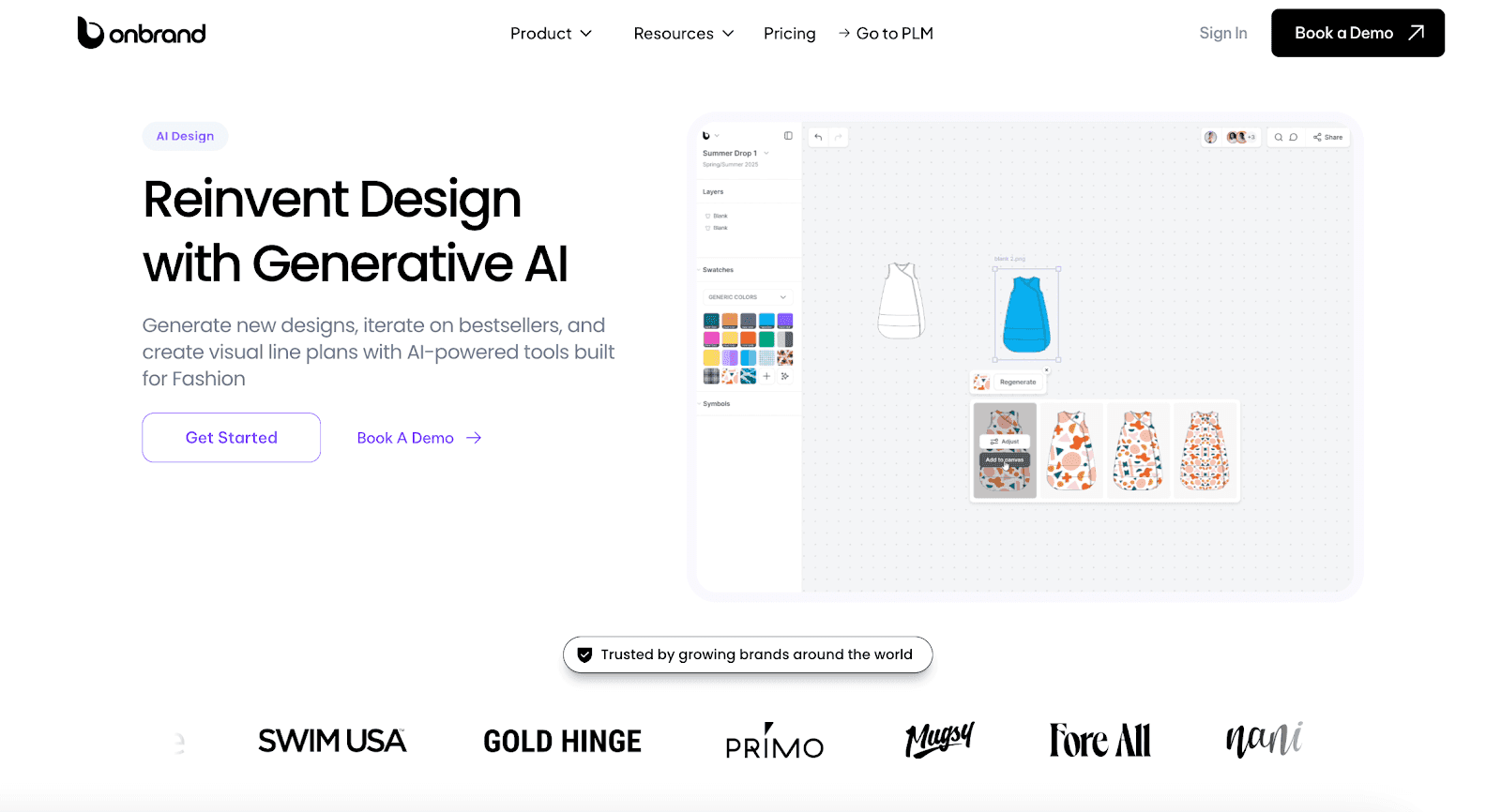
It helps designers turn prompts, sketches, photos, and inspiration into photorealistic concepts, flats, mockups, and visual assets that support decision-making during development.
Designers can explore colorways, trims, cuts, fabric textures, and design variations without rebuilding every option manually. Some brands use Onbrand AI Design to reduce physical samples by 30–50% while evaluating more concepts before development begins.
Key capabilities include:
Generative image creation from text, sketches, or photos
Automated color palette suggestions
Fabric and texture simulation
Technical sketch and flat generation
Layered editing for sleeves, trims, graphics, and design details
Version history and rollback
Shared boards, comments, and visual collaboration
Presentation mode for reviews and buyer meetings
Asset libraries for graphics, palettes, templates, and inspiration
The greater advantage lies in what happens after a concept is approved. Unlike standalone AI fashion tools, Onbrand AI Design connects directly to Onbrand PLM, allowing concepts, assets, and design decisions to flow into product development without disconnected files or manual handoffs.
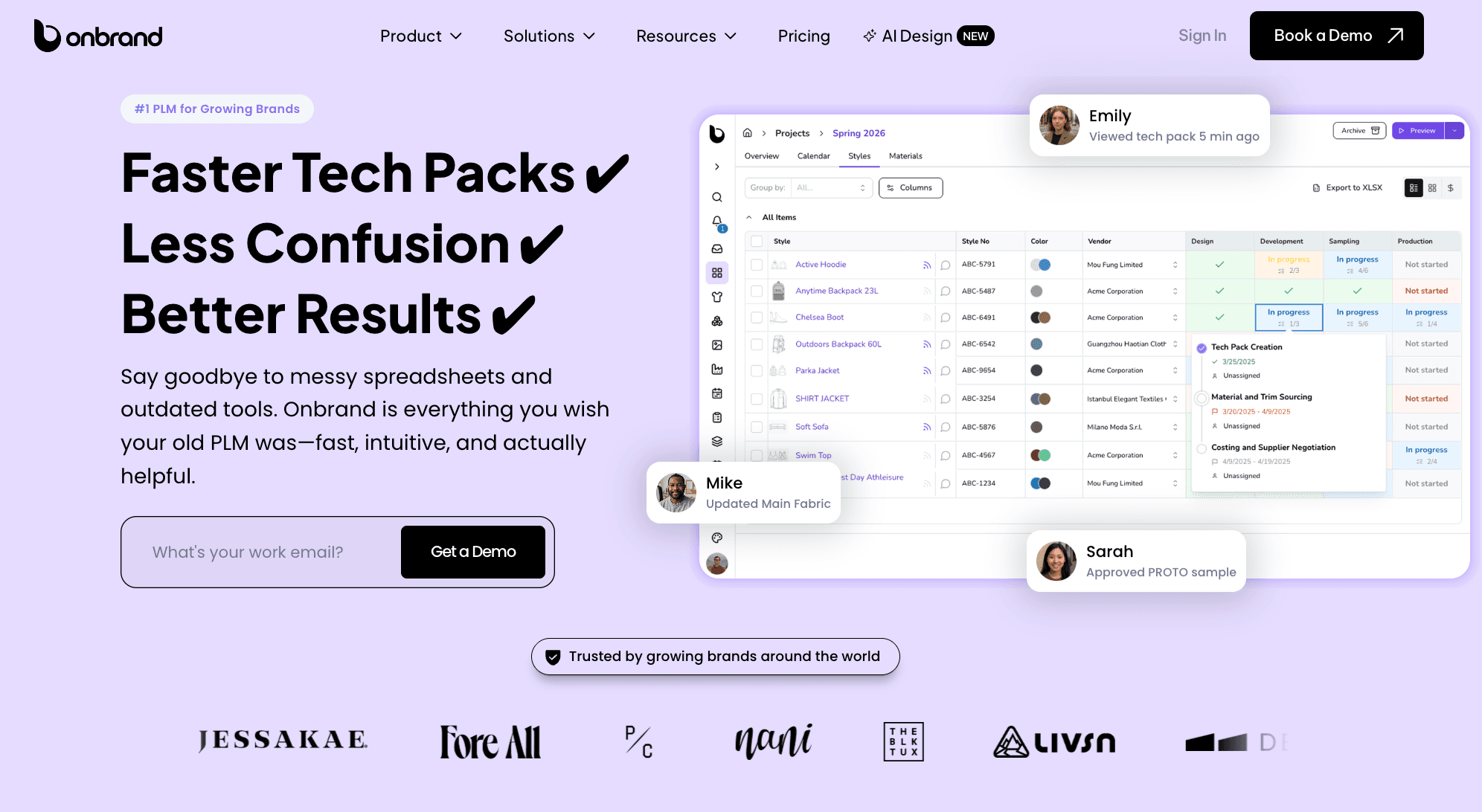
Onbrand PLM helps teams manage live tech packs, revisions, samples, approvals, vendor communication, and product data in one platform.
Brands using Onbrand have reported 55% faster tech pack creation, four-week shorter development timelines, and product creation cycles cut by up to 50% in customer case studies.
Design With AI. Develop With Onbrand.
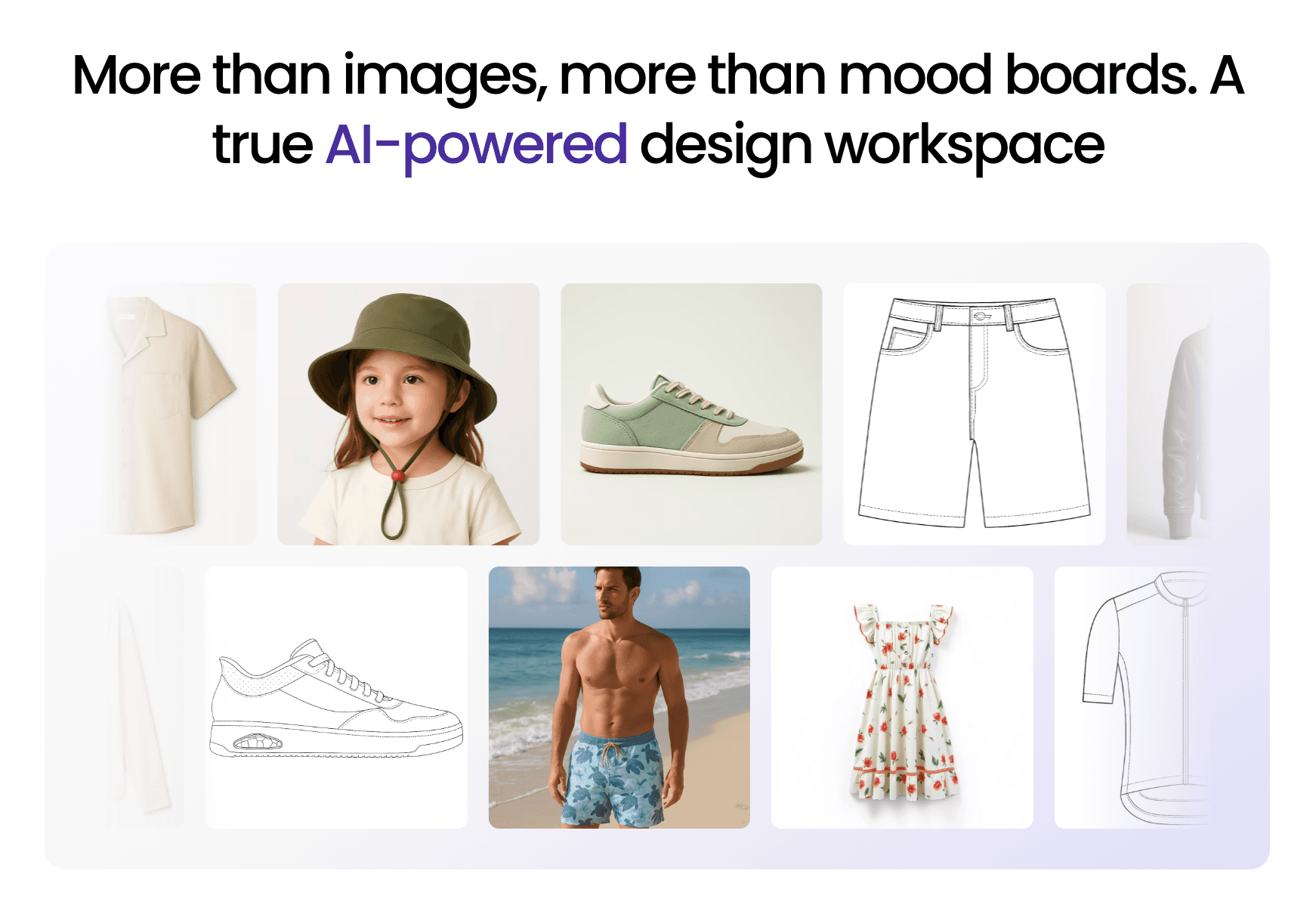
AI can help fashion brands generate concepts, explore variations, develop prints, and evaluate collections long before physical samples are created.
The biggest value comes from using AI as part of an existing design process. Designers still decide which concepts move forward, how products should be constructed, and what belongs in the final collection.
The best results usually come from connecting design exploration with product development. Concepts still need revisions, approvals, technical documentation, material decisions, and vendor communication before they are ready for production.
That is where Onbrand can help. Onbrand AI Design gives teams a faster way to explore and refine concepts, while Onbrand PLM keeps product data, tech packs, approvals, samples, and development work organized in one place.
FAQs About How to Use AI to Design Clothes
How do you use ChatGPT for designing clothes?
ChatGPT can help create design prompts, collection themes, color stories, garment descriptions, and creative briefs. Fashion teams often use it to organize ideas before generating visuals with AI design software.
Which AI app is best for clothing?
The best AI app to design clothes depends on your goals. Some tools focus on concept generation, while others support design exploration, collaboration, and product development. Fashion brands often evaluate tools based on how well they fit existing design and development processes.
For example, teams that want to connect AI-generated concepts with tech packs, approvals, and product development may consider platforms such as Onbrand AI Design.
Can AI help create entire fashion collections?
Yes. AI can generate coordinated outfits, seasonal concepts, and capsule collections that share a common visual direction. This allows teams to review a complete product assortment instead of evaluating one style at a time.
What happens after an AI clothing concept is approved?
Approved concepts move into product development. Teams typically refine details, create technical documentation, review materials, build samples, and prepare products for manufacturing and vendor collaboration.
Can AI-generated clothing designs be manufactured?
Yes, but AI concepts are only starting points. Designers, technical teams, and factories still need to review construction, fit, materials, and production requirements before a product moves into manufacturing. Some teams use virtual try-on tools to review styling before sampling. Concepts may also need adjustments for everyday life, cost targets, or sourcing requirements.

