Fashion ideas often begin with sketches, but production teams need something far more precise before garments move into sampling and manufacturing.
Questions about stitching, measurements, trims, and garment construction usually appear once development begins. That is a normal part of the larger design journey, especially when multiple teams, vendors, and factories are involved.
Technical flats help turn early design ideas into production-ready drawings. These technical drawings help factories and product teams review garment construction, measurements, and proportions more clearly.
In this guide, you’ll learn what technical flats fashion is, how they differ from fashion sketches, what details they should include, and how fashion teams use them in tech packs and production workflows.
What Are Technical Flats in Fashion?
Technical flats are simplified garment drawings used to communicate how a product should be constructed during development and production.
These line drawings usually show a garment laid flat from the front and back so production teams can review proportions and construction details clearly.
Fashion flat sketches typically use clean black-and-white linework to show seams, stitching, trims, pockets, closures, and other garment details without extra styling or artistic effects.
Unlike fashion illustrations focused on mood or presentation, the primary purpose of technical flats is production communication.
Design teams, factories, and patternmakers use these technical sketches inside a tech pack to review garments before sampling begins.
Technical flats help reduce confusion during technical drawing fashion workflows, especially when vendors and factories in other countries need clear construction details and measurements.
Most technical flats follow an industry-standard format with accurate proportions and simplified visuals so production teams can review garments more easily during development.
Technical Flats vs Fashion Illustrations
People in the fashion industry often confuse technical flats with fashion illustrations because both start from the same design idea. They support different parts of the development process and serve different purposes once garments move toward production.
Technical Flats Focus on Production Communication
Technical flats are used to communicate garment construction clearly during development.
These drawings use simplified linework, accurate proportions, and clear construction details so factories, vendors, and patternmakers can review the garment before sampling begins.
Unlike artistic sketches, technical flats focus more on production visibility than presentation. Teams use them inside tech packs to review seams, measurements, closures, trims, and other details needed during production.
Technical flats also follow consistent drawing standards, so suppliers in different parts of the fashion world can understand the same product information more easily.
Fashion Illustrations Focus on Styling and Creative Direction
A fashion drawing or figure sketch focuses more on mood, styling, and presentation.
Fashion designers often use these sketches to communicate creative visions, fabric movement, silhouette ideas, or the overall designer’s vision for a collection.
Illustrations help support early creative exploration, while technical flats help production teams move garments closer to manufacturing. One of the biggest key differences is clarity.
Technical flats focus on construction and accuracy, while illustrations focus more on visual storytelling and artistic style.
Why Technical Flats Are Important in Product Development
Technical flats serve important roles throughout fashion product development because factories need clear instructions before garments move into sampling and production.
Sketches alone usually do not provide enough detail for accurate production, especially when multiple suppliers and teams are involved.
Technical flats help patternmakers, vendors, and production teams review measurements, stitching, trims, proportions, and garment construction more clearly inside a tech pack. They also help reduce sampling mistakes before styles move into mass production.
Without technical flats, factories may interpret garments differently. One supplier may place a pocket differently, while another may misunderstand seam placement or garment proportions.
Language barriers and inconsistent documentation can create even more confusion during production. Those issues can delay approvals and create inconsistencies in the final product.
Clear technical flats also improve revision tracking during product development.
Teams can update construction details, communicate changes faster, and maintain more consistent product information between vendors in other countries.
That level of clarity becomes especially important when production timelines are tight and multiple factories are reviewing the same garment specifications.
Hand-Drawn vs Digital Technical Flats
Fashion teams use both hand-drawn and digital flats during product development. The right approach usually depends on the stage of development, revision needs, and how the team shares product information with vendors and factories.
Hand-Drawn Technical Flats
Hand-drawn flats are often useful during early concept development and creative exploration. Designers may sketch ideas quickly before moving into more detailed production work.
Best for:
Early ideation
Rough garment concepts
Quick silhouette exploration
Faster creative sketching
Limitations:
Harder to revise during development
Difficult to standardize for production
Usually need to be digitized before sharing with factories
Less practical for large product lines
Digital Technical Flats
Digital flats are more common during production because teams can revise measurements, stitch lines, and garment details more easily throughout development.
Programs like Adobe Illustrator and other digital drawing or computer-aided design (CAD) tools help teams create cleaner technical drawings with accurate proportions and reusable templates.
Many teams also export digital fashion flats as PNG files for supplier reviews, approvals, and tech pack updates.
For growing fashion brands, these digital tools become essential tools for managing revisions, improving consistency, and helping teams save time during development. Fashion designers learning Illustrator or technical drawing workflows can also use online tutorials to build technical flat skills more quickly.
Best for:
Production-ready technical flats
Revisions and approvals
Clearer factory communication
Scalable product development workflows
Limitations:
Takes time to learn the right tools
More detailed setup during the early stages
Requires familiarity with digital tools like the pen tool and layer systems
Modern workflows also give fashion teams more flexibility during early development. Tools like Onbrand AI Design help teams explore silhouettes, trims, and garment variations visually before finalizing technical flats for production.
How Fashion Teams Create Technical Flats
Creating fashion flats usually starts with a rough garment idea, then gradually moves into a more detailed production drawing. The exact drawing process may vary between teams, but the core workflow stays fairly consistent throughout product development.
Step #1: Start With a Garment Template
Most teams begin with a croquis, base block, or silhouette guide to help maintain garment proportions more consistently. Templates also make it easier to create multiple views of the same garment during development.
Different garment types usually require different base templates. For example, a team creating a denim jacket may start with a standard jacket block before adjusting sleeve shapes, collar proportions, pocket placement, and panel construction.
Step #2: Draw the Garment Shape
The next step focuses on the overall garment structure. Designers draw fashion flats using clean outlines, balanced symmetry, and accurate proportions so factories can review the garment more clearly later in development.
Teams usually sketch the body shape first, then refine sleeves, collars, hems, and pocket placement before adding smaller construction details. Clean outlines help production teams identify proportions faster during sample reviews.
Step #3: Add Construction Details
Construction details help production teams understand how the garment should be assembled.
Technical flats usually include stitch lines, seam placement, closures, panels, topstitching, and other details connected to garment construction.
Step #4: Create Front and Back Views
Front and back views give factories better production visibility, especially when garments include panels, pleats, hoods, pockets, or other details that cannot be fully shown from one angle alone.
Back views are especially important for garments with yokes, seam shaping, embroidery placement, or hood construction because those details often affect patternmaking and assembly.
Step #5: Add Measurements and Callouts
Once the flat is finalized, teams add measurements, construction notes, and production callouts to prepare the drawing for tech pack integration and factory review.
Callouts may include pocket dimensions, stitch types, zipper lengths, label placement, or fabric notes that help suppliers follow the intended garment specifications more accurately during sampling.
What a Technical Flat Should Include
Technical flats should stay clear, practical, and easy for production teams to review during development. The main purpose is to communicate garment construction accurately before sampling and approvals begin, while keeping the flats simple enough for factories to review quickly.
Key features usually include:
Front and back views for better garment visibility
Seams, topstitching, darts, pleats, and panels
Trims and hardware like zippers, buttons, labels, and drawcords
Measurement reference points such as HPS, chest width, sleeve length, and inseam
Fabric notes and production callouts connected to the tech pack
Technical flats should also include enough detail for factories and vendors to understand how the garment should be assembled without overcrowding the drawing.
For example, a jacket flat may include stitch lines, zipper placement, pocket construction, panel shapes, and other intricate details, while simpler flats may only require basic measurements and core design elements.
Clear technical flats also support specification management during product development because teams can review revisions, measurements, and construction updates more consistently before production moves forward.
Best Practices for Keeping Technical Flats Clear and Consistent
Clear technical flats help production teams review garments faster and reduce confusion during sampling and approvals.
Small drawing inconsistencies can lead to production errors later, especially when multiple vendors and factories review the same tech pack.
Professional flats should use clean linework, balanced symmetry, and accurate proportions so garment details stay easy to understand throughout development. Technical designers also maintain consistent line weights to improve visual clarity between seams, panels, topstitching, and trims.
Professional-looking fashion flats usually avoid excessive styling, shadows, or decorative effects because those details can distract from construction communication.
Zoomed-in callouts can help production teams review smaller construction areas like pocket stitching, zipper placements, or seam finishes without overcrowding the main flat.
Color should stay separate from garment construction notes whenever possible.
Teams often use the original drawing for structure and create separate colorways or material references elsewhere in the tech pack to keep revisions easier to manage later in production.
Why Technical Drawing Revisions Become Difficult During Product Development
Technical flat revisions become harder once garments move into sampling and production because product details keep changing throughout development.
A measurement may change after a fit session. A supplier may recommend a different zipper. A factory may adjust seam placement for production. Those updates often affect multiple parts of the tech pack at the same time.
Problems usually start when revisions are managed in separate files, screenshots, emails, or outdated PDFs.
Common issues include:
Suppliers reviewing older versions of technical flats
Comments scattered between email threads and spreadsheets
Missing approval updates during sampling
Trims and measurements changing without updated drawings
Factories referencing different garment specifications
Disconnected tech packs are slowing communication between teams
For example, one factory may receive an updated sleeve measurement while another still works from an older flat with previous dimensions. Small inconsistencies like that can create sampling delays and production mistakes quickly.
Centralized workflows help reduce confusion because design teams, developers, vendors, and factories can review current technical flats, approvals, and product updates from one source during product development.
Managing Technical Flats in Modern Fashion Workflows
Technical flats usually continue changing long after the first sketch is approved. Measurements get updated after fittings. Construction details shift during sampling. Vendors request adjustments before production begins.
Once revisions start moving between spreadsheets, PDFs, email threads, and separate tech pack versions, product information becomes harder to manage consistently.
Modern product development teams often manage technical flats inside connected systems where drawings, measurements, approvals, and supplier communication stay in one place.
Onbrand AI Design for Early Technical Flat Exploration
Early design work often changes quickly before garments reach production-ready technical flats.
Design teams may test different silhouettes, trims, pocket placements, proportions, or styling directions before finalizing a single design concept. Rebuilding flats manually every time a revision happens can slow creative exploration early in the fashion design process.
Onbrand AI Design helps teams generate and explore concepts faster using sketches, prompts, reference images, mood boards, and visual variations in one collaborative workspace.
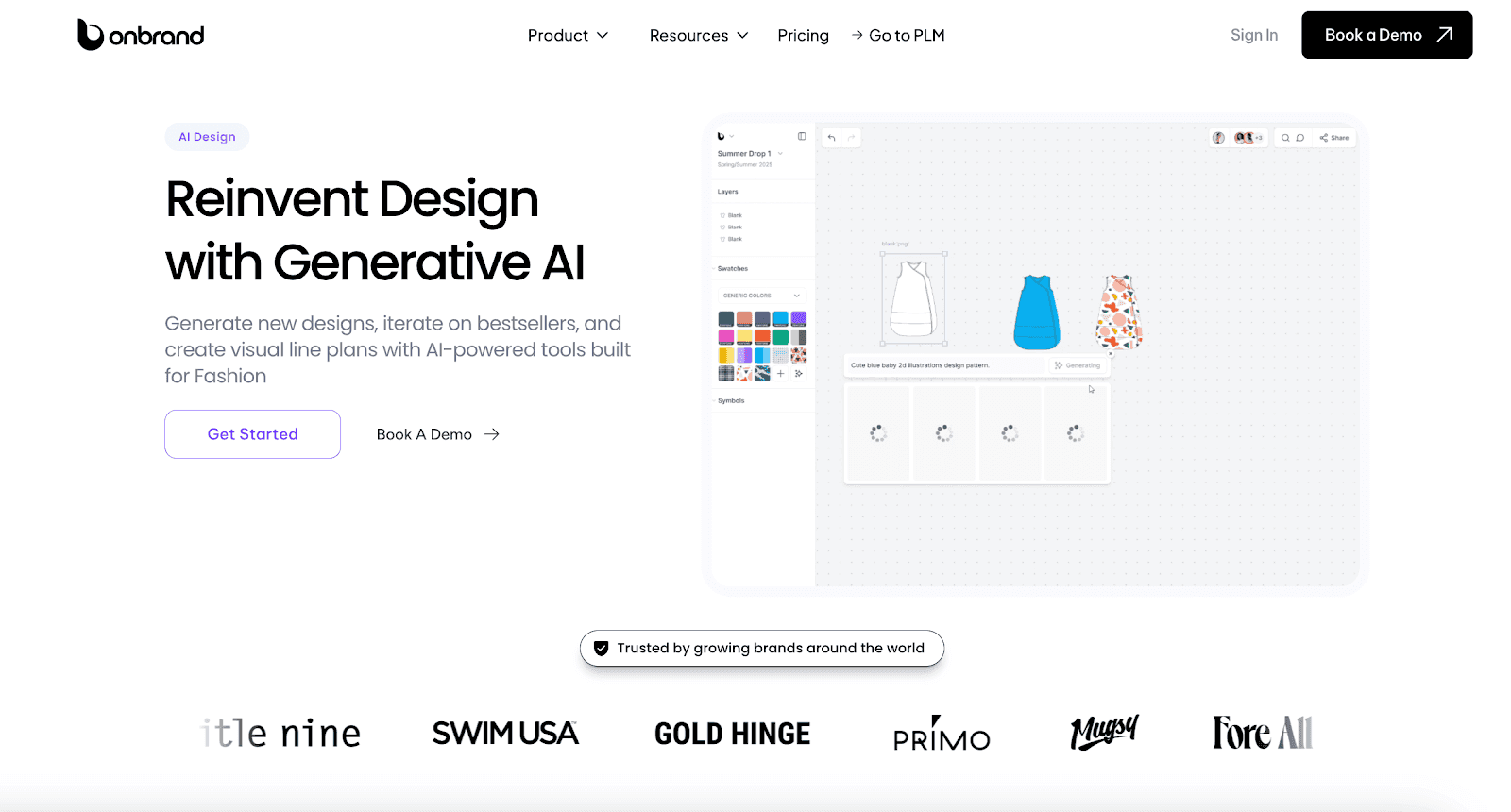
Teams can:
Generate early garment concepts from sketches or prompts
Test colorways, trims, and proportions visually
Create photoreal renders and digital fashion design concepts
Review revisions collaboratively with comments and version history
Transform sketches into technical flat directions before tech pack development begins
Onbrand AI Design also helps reduce physical samples by 30–50% during early development by keeping concepts, revisions, and approvals connected before technical drawings move into production workflows.
Onbrand PLM for Managing Technical Flats and Tech Packs
Once technical flats move into sampling and production, teams need more than static PDFs and disconnected spreadsheets.
Onbrand PLM keeps technical flats connected with measurements, grading, bill of materials (BOM) data, specs, approvals, sample tracking, and supplier communication in one system.

Production teams can:
Manage revisions directly inside live tech packs
Track approvals and sample updates more clearly
Reduce confusion caused by outdated files
Centralize product data and technical drawings
Communicate directly with vendors inside the platform
Maintain one current version of product information
Unlike traditional PLM systems that require months of onboarding and heavy customization, Onbrand focuses on faster setup, simpler collaboration, and modern product development workflows built for growing fashion brands.
Brands using Onbrand PLM have reported 55% faster tech pack creation, up to four-week reductions in development timelines, and better visibility between design, development, and production teams.
Bring Technical Flats Into One Connected Workflow With Onbrand

Technical flats help fashion teams turn design ideas into production instructions that factories, vendors, and product teams can actually work from.
Once revisions, approvals, measurements, and tech packs become scattered between disconnected files, production mistakes and delays become harder to manage.
Modern fashion teams need more than disconnected spreadsheets, PDFs, and email threads to manage technical flats during development.
Onbrand supports that process through AI-powered design exploration and modern fashion PLM workflows built for growing fashion brands. Teams can manage technical flats, live tech packs, revisions, and vendor communication in one connected workspace from concept through production.
FAQs About Technical Flats Fashion
What are the four types of technical drawings?
The four common types of technical drawings in fashion are technical flats, construction drawings, specification drawings, and pattern drawings. Fashion teams use them to communicate garment measurements, construction details, stitching, and production instructions during product development.
Why are front and back views important in technical flats?
Front and back views help factories and patternmakers see the full garment structure before sampling begins. Certain construction details, like seam placement, hoods, yokes, pleats, or pocket placement, may only appear from one angle.
What are the seven types of fashion styles?
Seven common fashion styles include classic, casual, streetwear, bohemian, minimalist, sporty, and formal fashion. These styles describe visual aesthetics and consumer preferences, not technical garment construction.
How do technical flats help reduce sampling errors?
Technical flats reduce sampling errors by giving factories clearer construction instructions before production starts. Accurate measurements, stitch lines, trims, and garment details help suppliers follow the intended design more consistently during sampling.
Why do brands use Adobe Illustrator for technical flats?
Brands use Adobe Illustrator because it helps teams create clean technical drawings with accurate proportions and editable vector linework. Illustrator also makes revisions, measurements, colorways, and tech pack updates easier to manage during product development.

